Mabinogi Lazy Patch: What It Is and How to Patch Faster the Safe Way
What does "Mabinogi lazy patch" mean?
You’ll see the phrase used in three ways. Knowing which one you’re looking at saves a lot of confusion.
A faster way to update. This is the most common meaning. Players just want to stop waiting on long downloads and file checks. Usually the real answer is the launcher’s own repair tool.
A third-party patcher. Some community tools were built to patch the game outside the official launcher. One well-known example is Power Patcher. Its own page says it no longer works because the patch process changed, and the author has no plans to update it. github
A mod pack that makes gameplay easier. These change how the game plays. They have nothing to do with patching.
Many blog posts mix all three together. That’s why this topic feels so messy.
Is the Mabinogi lazy patch official?
No. Nexon’s support pages never mention it. For a client that won’t patch, they point players to two things: Repair Installation in the Nexon Launcher, or Verify Integrity of Game Files on Steam.
How to fix slow or stuck Mabinogi patching
Try these in order. Most problems are gone by step 4.
- Restart the launcher and your PC. Boring, but it clears a lot of stuck downloads.
- Check your free disk space. Nexon lists 10 GB of free space or more, and says extra free space helps the game run smoother. nexon
- Use a wired connection if you can. Pause other big downloads while Mabinogi updates.
- Run a repair. Steps for both launchers are below.
- Check your antivirus. Nexon has a support article for when antivirus software detects the Nexon Launcher. Add exceptions for the official Mabinogi and Nexon folders only. Don’t switch your protection off for good. Nexon
- Reinstall the game. Do this last, only if nothing else worked.
Repair Installation (Nexon Launcher)
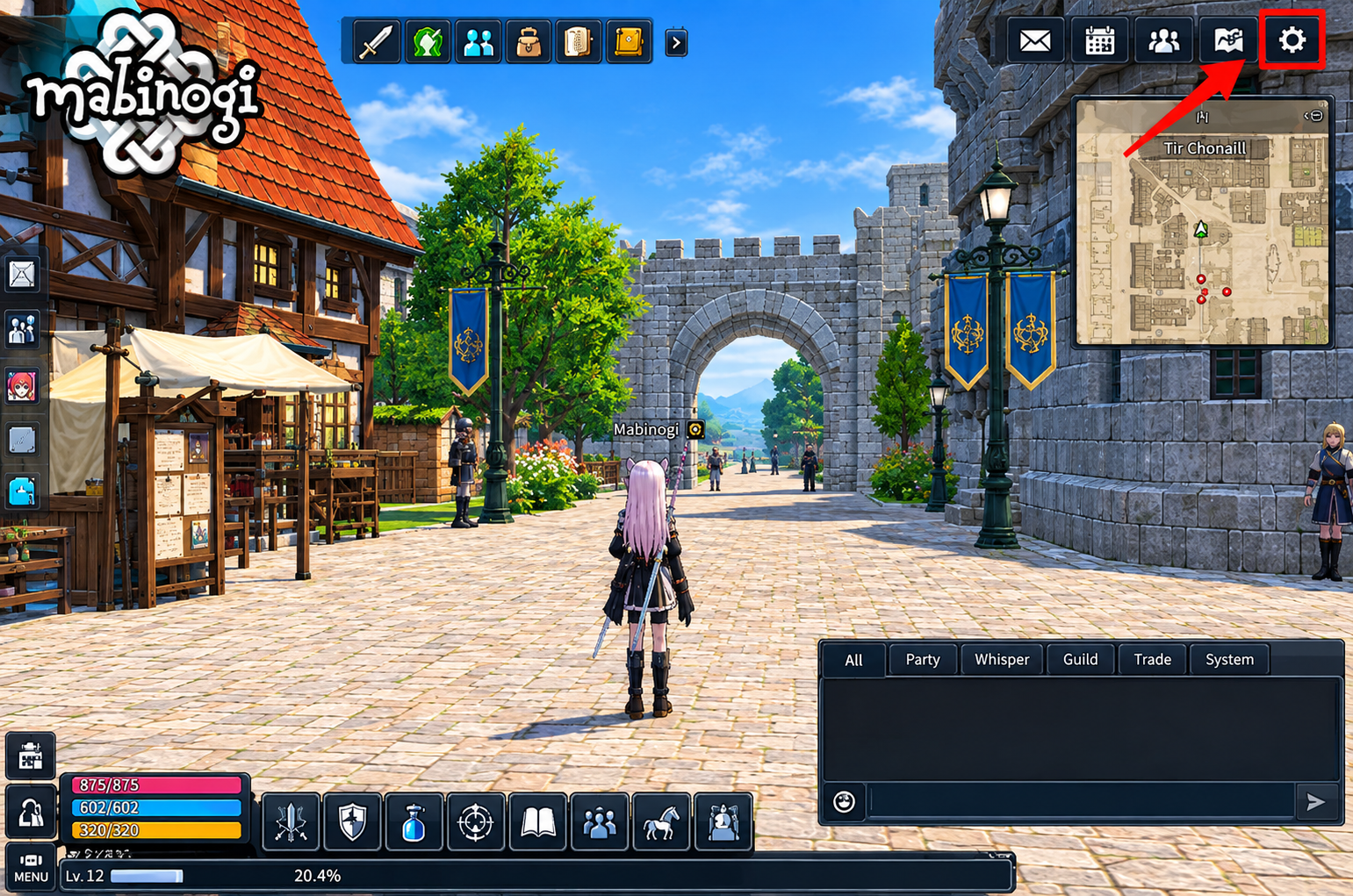
Open the Nexon Launcher, go to the Mabinogi page, and click the gear icon to open Game Settings. Click “Game Configure” in the sidebar, choose Mabinogi, then click “Repair Installation” and press OK. The launcher then checks your game folder for missing or damaged files and downloads or updates them. When it finishes, the normal Play button comes back. MabinogiMabinogi
Verify files (Steam)
Open your Steam Library, right-click Mabinogi and choose Properties. Go to the “Local Files” tab and click “Verify Integrity of Game Files…”. Steam will check everything and re-download whatever is missing. Mabinogi
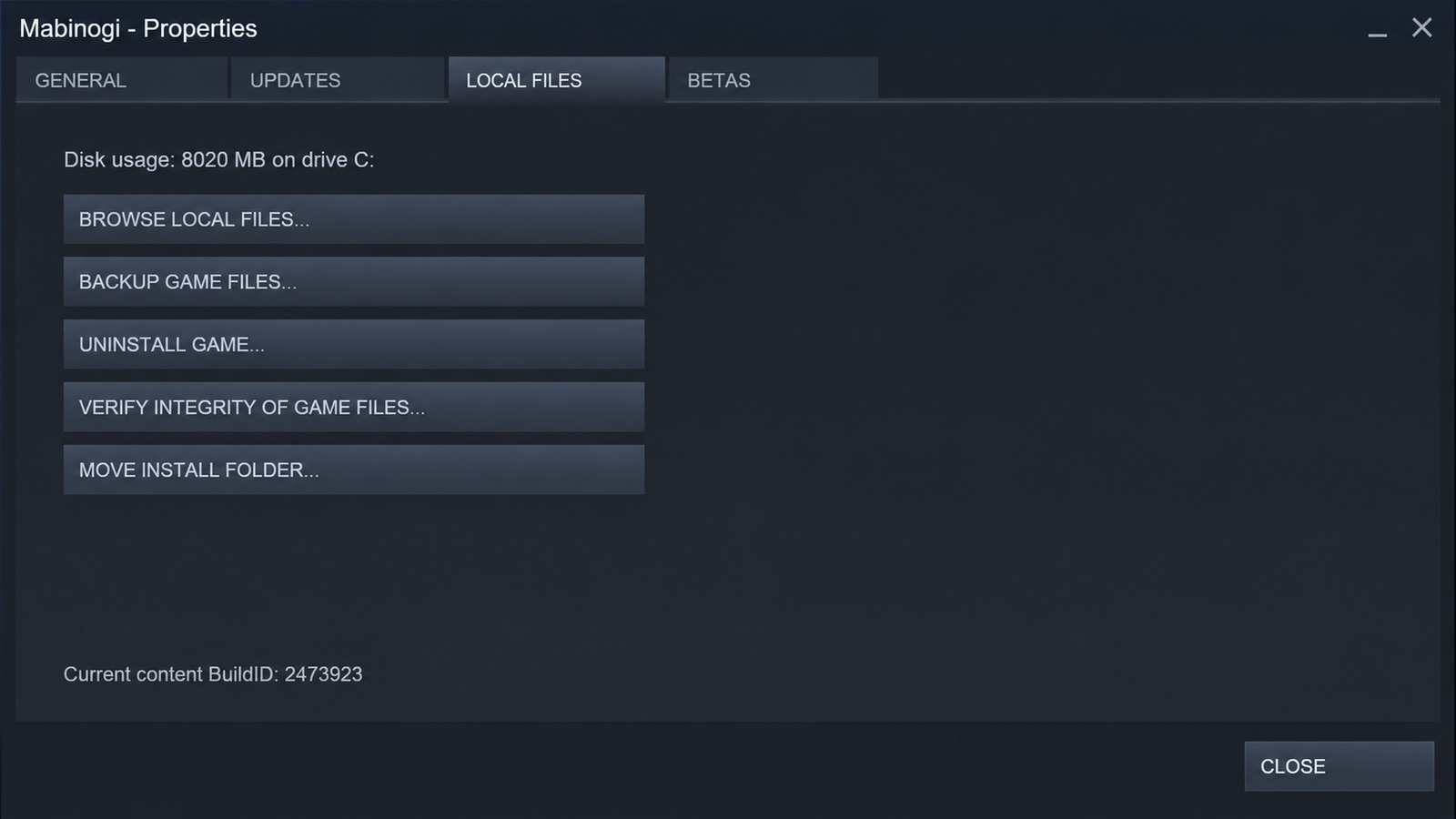
The menus can look a little different as launchers get updated. The option names stay close to these.
Why third-party patchers are a bad idea
This is the part most lazy patch articles skip.
Since January 18, 2024, Nexon shuts down any extra game client on the same device. It also closes the client if it detects unauthorized third-party programs or launchers. Nexon adds that breaking the Terms of Service may lead to account termination. MabinogiMabinogi
So a patcher can do more than fail. It can stop you from playing.
Nexon has also told players to delete unofficial files from the game folder and then run a repair or verify. If you already installed some “lazy patch” file, that’s what to do. Steam
Files from unknown websites carry another risk. You can’t check what’s inside them. Your Mabinogi account isn’t worth that.
Official fixes vs third-party tools
Method | Safe to use? | Notes |
Repair Installation (Nexon Launcher) | Yes | Official, works with the current client |
Verify Integrity (Steam) | Yes | Official, works with the current client |
Old patchers like Power Patcher | No | Built for an old patch process |
“Lazy patch” download from a random site | No | Unknown source, may get your client closed |
Patching slow or game lagging?
These are two different problems. Slow patching is about your download, disk or damaged files. Lag inside the game is usually about ping and your network route. Repairing files won’t fix lag, and a VPN or routing tool won’t fix a broken download.
One more thing. Mabinogi Mobile is a separate game from the PC version, developed by devCAT and published by Nexon. Steps for the PC client don’t apply to it. exitlag
FAQ's
What is the Mabinogi lazy patch?
It’s a player-made phrase, not an official Nexon feature. It usually means a faster or easier way to update the game.
Is the Mabinogi lazy patch safe?
The official repair tools are safe. Unofficial patches and random downloads are not, and Nexon’s client can close when it detects them.
Can I get banned for using it?
Nexon says unauthorized third-party programs can get the client terminated, and Terms of Service violations may lead to account termination. It’s not worth the risk.
Why is my Mabinogi update so slow?
Common causes are a weak connection, low disk space, damaged files, antivirus interference, or a busy patch server. Run through the fixes above in order.
Does it work on Steam?
Steam has its own tool. Use Verify Integrity of Game Files.
Still stuck after a repair?
Submit a ticket to Nexon support. Mabinogi
Conclusion
Mabinogi Lazy Patch is commonly used by players to describe an easier or faster way to deal with Mabinogi updates and patching. However, there is an important difference between an unofficial patching tool and the repair options provided through the official game launchers.
If your Mabinogi update is slow, stuck, or showing an error, start with the safest solutions first. Restart the launcher, check your internet connection and available storage, and use the built-in repair or file verification options when necessary.
You should also be careful with unofficial patchers and downloads from unknown websites. Before installing any third-party tool, check its source and make sure it is compatible with the current version of the game.
At Mabinogi Lazy Patch, our goal is to provide simple guides and useful information that help players understand patching problems and troubleshoot them step by step. For account-related or game-policy issues, always refer to the appropriate official Mabinogi or Nexon support resources.